Showing posts with label Typography. Show all posts

Monday, January 28, 2013

Friggin' Shit Love Series


Here's a snap shot of a project I'm working on. Not sure yet of an end medium or application. Let me know if you have any ideas for me for uses. It is still definitely a work in progress.

Finding Font • D

Sunday, March 18, 2012

Typography: The Cost of Fonts

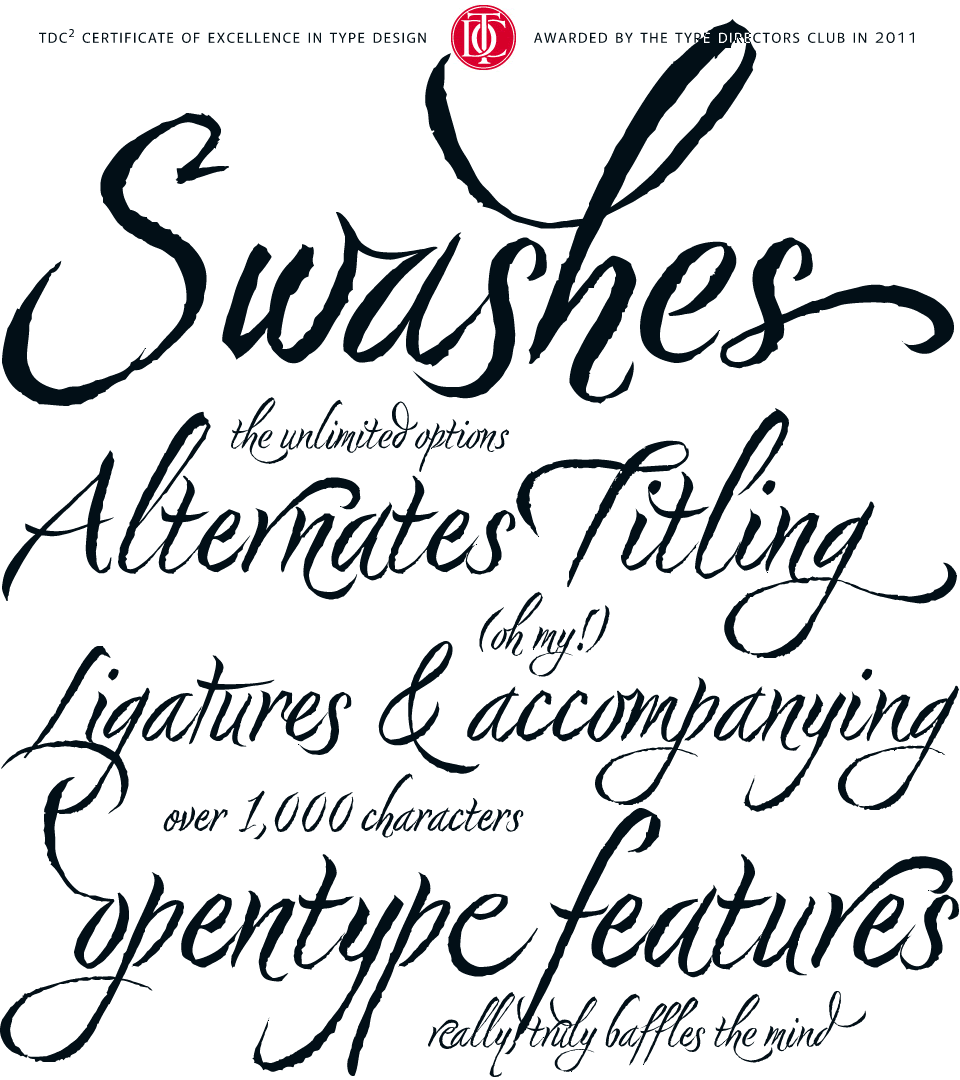
Nori by Niel Summerour, is a hand-lettered typeface that 
contains over 1100 glyphs, 250 ligatures, 487 alternate 
characters, 125+ swash and titling alternates, lining and 
old style numerals.

Buying and owning fonts. This was a concept that was alien to me before beginning the graphic communications program. Fonts where just something that came along with Word. You had what you had and you made due with them. I knew nothing about where fonts came from, how I got the ones I had or that I could even get more.

Upon entering design school, I -- like many beginning designers -- dove head first into the free font sites. Countless different typefaces, all free for my using. "Why pay upwards of $40 for 'commercial' fonts when I can download all the fonts I could ever need for free," I thought. 

Well, as time, experience and education often do, I was quickly shown the error of my ways and learned that free fonts are free for a reason, and even though I can download them for free, it doesn't mean that I can freely use them for any project. As outlined in the article, "Why are font so expensive?" from 1stwebdesigner.com , you truly do get what you pay for and an exorbitant number of these free fonts are very low quality. But what makes a font low quality? Free fonts will often lack consistency throughout letterforms, have irregular or "botchy" curves, have missing characters, very few will have any alternates or special ligatures or any thought given to kerning. Also, free fonts rarely come in more that one style or weight, drastically reducing their usage. In addition to this, many of these "free" fonts are only free for personal use. As soon as you use them commercially, licensure issues come into play.  

OK, so now I knew why free fonts aren't all that they are cracked up to be, but I still didn't understand why professional quality fonts cost as much as they do. This I didn't learn until I began creating my own fonts. There is a huge amount of time that goes into the planning and drawing of characters in a font.  This is some of what you pay for but the real value of commercial fonts comes in the technical aspects and math associated with them -- the attention given to spacing between specific letters. This is important, for example,  because an "i" and "g" will fit together very differently than an "s" and a "g," and if all of the letters are just quickly knocked out and given the same spacing, it creates strange gaps and words become disjointed and therefore less legible. Commercial fonts will almost always come in different weights, making them much more useable for a variety of different purposes. In addition to this, many higher quality fonts, especially script and handwritten fonts, will come with a built in set of ligatures and alternates. These fonts will come at a higher cost as these special features require additional thought, planning and time executing them. 


Friday, March 16, 2012

Graphics Math: Type Terms and Measurements


In his book, "The Newspaper Designers Handbook," Tim Harrower compares using type right out of the computer to wearing a suit right off of the rack. "It won't fit right until you tailor it a bit," Harrower said. 

This means that we, as designers, need to pay close attention to the kerning, tracking, justification and leading of all of the type we use. Below are some standard type terms and their definitions. 

Leading: The space between lines of type and is measured from baseline to baseline. Leading is not the same as line spacing. Line spacing measured in proportional measure (single, double, etc.). Where leading is measured in exact values, such as points.
Baseline:
 Where all the lowercase letters sit

Ascender: Things that go above the cap height
Descender: Things that hang below the baseline
Xhight: How tall the majority of all the lowercase letters are
Cap Hight: How tall the majority of the capital letters are
Kerning: The adjustment of the space between individual letter forms 
Tracking: The uniform adjustment of spacing applied over a range of characters

Thursday, March 15, 2012

Typography: Moving from Paper to Pixels

I have finally finished drawing out all of my lowercase letters and due to the time constraints of working within a school-year schedule have decided to jump into the software with them rather than finish the uppercase, numbers, punctuation, etc.

I scanned my drawings and have begun tracing the outlines in Illustrator, then I copy the paths into TypeTool to resize and adjust paths as needed. At this point, it appears that everything is working alright, but I'm afraid that the paths I am drawing in Illustrator are looking too smooth and polished, undoing the hand-drawn look that I am aiming for.

I keep reminding myself that this isn't the end-all be-all with this font and I can always go back and redo things. It's all part of learning process, I guess.

Thursday, February 2, 2012

Tidbits: Twitter and Typography


This right here is why I love Twitter. I decided to seriously begin working on my font for class today, but after grabbing some paper and locating a sharp pencil, I realized that I had no clue where to begin. I had an idea and a couple sketches to work from but other than that I was lost. So, I took to Twitter and asked two of my typography/lettering idols for their opinions and they both actually responded. Now with professional advice in hand and a head full of ideas, I head to the drawing board, or folding table and typing paper, as it were. 

A big thank you to Jessica Hische and Chank Diesel for their helpful hints. 

Monday, January 30, 2012

Typography: Legibility, Context and Creativity

In essence, all letters are symbols that indicate a vocalization. When put together with other letters, they form words that have specific meaning and in turn, form language. For this reason, if the intent is for the words to be read and convey information to the viewer, it is vitally important for the designer of the letterforms to not stray too far from what is recognizably legible.

The idea of recognizable legibility deals with idea that the time period and current standards of normality play a huge role in what the view would perceive as easily readable. As explained by Bruce Willen and Nolen Strals in their book, Lettering & Type: Creating Letters & Designing Typefaces, "What was regarded as a clear and beautiful writing style for a twelfth-century Gothic manuscript is to today's readers as difficult to decipher as a tortuous graffiti script." They go on to say that what we, today, see as a clean, universally readable sans serif would have been viewed by nineteenth-century typographers as "crude and hard to read." For this reason, designers must always be conscious of the context in which their work will be viewed, and cater to it. After all, if a letter cannot be recognized as a letter and doesn't function as a letter, is it really a letter?

There is, as with most all aspects of design, a great deal of wiggle room for creativity in type design and lettering. This is because the inherent functionality of letters, as Willen and Strals note, comes, too, with a "surprisingly wide rage of emotions and associations -- everything from formality and professionalism to playfulness, sophistication, crudeness and beyond." These emotions and associations come from years of subjection to advertisers and branding. For example, the Giorgio Armoni logo is created with Didot Headline. Whenever  we see Didot in other uses, either consciously or subconsciously, we equate it to Armoni or at least the high fashion, high price, clean, tailored look of Armoni. The same can be said of the modern (or at least before the age of Facebook), playful look of Arial Rounded Bold in the myspace logo or the friendly, corporate neutrality of Helvetica in the failed Gap logo (as well as countless other, more successful logos).

Also coming into play here, are display or feature fonts that aim to create a specific look, feel or emotion, not from a well recognized usage of the font, but from creative elements that the font designer built into the characters. This can be seen in cracked and grunge fonts, graffiti fonts, hand-written fonts, etc. These the use of these fonts, however, is widely disputed among designers.
This reminds me of some of the interviews in the 2007 documentary Helvetica. Some designers, such as traditional Modernist Massimo Vignelli believe type should be the vessel for the message, not the message itself. “I don’t think that type should be expressive at all. I can write the word ‘dog’ with any typeface and it doesn’t have to look like a dog. But there are people that [think that] when they write ‘dog’ it should bark.”

Conversely, David Carson, former graphic designer of Ray Gun magazine, said, commenting on a number words typed in Helvetica, "That doesn't say 'caffeinated' - it just sits there. Nothing caffeinated about it."

As a designer in today's climate, I feel that there are opportunities to utilize all of the fonts available to us. Obviously, a grunge font wouldn't be appropriate for all clients, but either is a traditional Helvetica. We just need to be acutely aware of the client and their needs as well as the specifics of their audience — their background … their normal — and cater directly to that.


Sources: 
Lettering & Type: Creating Letters & Designing Typefaces by Bruce Willen and Nolen Strals
Helvetica (2007)

Tuesday, January 10, 2012

Tech Journal: "Design Elements" Chapter 3 Review Paper

Type as Information

Graphic Communication. Presenting information ­— educating, entertaining, inspiring ­— in an aesthetically pleasing format. It is often said that a picture is worth 1000 words, but a picture by itself will be interpreted differently by each person who views it. This is where type proves its worth. Not only can the words themselves literally say what the message of the piece is but the font choices and treatments, when used effectively, can help to further imprint the visual message. Typography, too, can help the viewer navigate a design, when directly or indirectly. This is why type must be chosen and presented carefully, with planning and consideration. 
The presentation of type holds such a great deal of weight that the author refers to as “one of the designer’s most important tasks.” Specifically, it is important that the designer give the information an order, or structure. This is called hierarchy and when used effectively it allows the viewer to navigate through a design as was intended by the designer. Hierarchy should visually tell a viewer where to begin looking a design, what order to work through it and where to end. Therefore, hierarchy is essentially the importance the designer assigns to each element. As designers, we are often saddled with the task of determining what, in fact, is the most important aspect of the design that we want the viewer see first. This is done by first reading the text and then deciding what the viewer needs to see first. 
This visual show of importance is done through a number of different ways. The spaces around and in between text can be manipulated to create different levels of importance. The size assigned to each element, too, will help develop these levels of importance. A well designed newspaper provides a very good example of this.  The traditional formula for designing a news package is a large headline with a good amount of white space around it. This must be the first thing that a view sees as it will, in most cases, determine if they will read the rest of the story. The headline is , depending on space and availability, followed by a photo or graphic with a cutline tucked in close by and in some cases overlapping the photo. This proximity lets the viewer know that these two elements go together.  The photo and cutline are usually followed by a smaller subhead and even smaller body copy. This order creates a level of hierarchy that lets the viewer know where to start and how to progress through the package. 
With the newspaper as well as most design projects, a small number of fonts are selected for a specific purpose and then used throughout the  design. This creates unity in the design. In most cases designers are warned against using more than three fonts in a design. When selecting fonts, the author stresses the importance of combining fonts that have similar qualities, such as “proportion, weight and terminal shape.” He says that it is not necessary to hit the viewer over the head with a font change when the content requires differentiation. This is because very small changes in type are easily recognized. A slight change will clue the viewer into a change but will also help to create unity and “interrelationships within the content.”
The placement of the type also indicates how it is related. Keeping related blocks of text closer together indicates that they are related while giving more space between text blocks indicates that they are not related. Likewise, shallow columns of text arranged horizontally with a space in between — that allows the viewer to differentiate the columns ­— indicate to the viewer that these short columns are directly related. I contrast, breaks in vertically aligned text indicates that the segments are unrelated. Along with grouping, using geometric forms ­— like bullet points for lists — or lines can help the viewer know what is related and what is not. This indication of relation allows the viewer to more easily navigate the design and aids in delivering the message correctly and as intended.


Source: "Design Elements: A Graphic Style Manual" by Timothy Samara 

Tuesday, November 15, 2011


In a moment of weakness, a bit a my Christmas spirit seeped out of me early, and I got a jump start on my Christmas card design. I just wanted to share a glimpse of this year's design and show off the lettering I created for it. I also had alot of fun with the illustration.
If you have been unfortunate enough to be added to my Christmas card list, you'll know that my cards get more sad/creepy with each passing year. Well, this year's is sure to not disappoint. I'll share the whole card after they are mailed.

Thursday, November 3, 2011

Projects: Typography Quote


I just wanted to share a typography project I am working on. I have been trying to find and emulate more and more type treatments by talented typographers and letterers in the hope of making all of the type I use more special. 
On a related note, I am working on putting together an independent study class for myself for next semester on Advanced Typography techniques. I plan on spending about four weeks going over various topics such as the beginnings of electronic typography, web type and advanced style sheets and then spend the rest of the time creating my own font from beginning to end. I'm pretty excited.

Wednesday, September 21, 2011

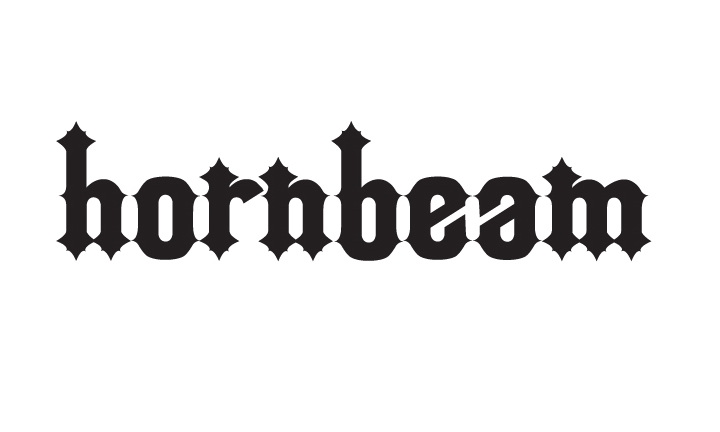
Typography: Introducing Hornbeam

Last week I attended a workshop by Minneapolis based font designer Chank Diesel. Since then I have had the idea in my mind that I need to create my own font. While sitting through a lecture recently, I sketched out half of a lowercase "h" on the bottom of a quiz and hornbeam was born. I named it hornbeam because those were the first letters I created. I later found out that a hornbeam is a type of tree. Unrelated, I know.

I now almost have the whole lowercase alphabet finished and am excited to start on uppercase and for my first font ever I think it looks pretty good. I am really looking forward to being able to type with a totally original font. I'll share the entire font when I get that far. Until then, let me know what you think of these first characters.

Thursday, September 1, 2011

Going Deeper: Helvetica Neue

Through the 1960s and '70s Helvetica grew in popularity as the modernism trend took hold. Today, however, it is viewed by some as overused, plain or tired. I don't agree though. It is clean, strong and simple, lending itself to many, varied uses, and with the addition of Helvetica Neue (neue meaning new in German) it truly has endless possibilities. 
Since Helvetica's creation, is has been re-designed and refined by a number of designers to give it a larger variety of weights. This made things difficult as different weights designed by different designers were given the same or similar names or the same weight often had different names. 
In 1983, it was reworked as a complete set by D.Stempel AG, the daughter company of Linotype, and Helvetica Neue was born. Differences in alignment were corrected, subtle features were made consistent from one face to another, and all the weights and widths were designed to work together as one family. Changes included improved legibility, heavier punctuation marks, and increased spacing in the numbers. The outcome was a synthesis of aesthetic and technical refinements that resulted in improved appearance, legibility and usefulness. (www.fonts.com)
The font family is made up of 51 fonts including 9 weights in 3 widths, and an outline font based on Helvetica 75 Bold.


Sources:

Tuesday, August 9, 2011

Tidbits: A Quick & Comprehensive Type Guide

I came across this infographic today and thought that it did a pretty good job of condensing most of the typography "rules" down into a user friendly graphic.


Thursday, April 14, 2011

An Introduction to Web Fonts

For this post, I just pulled together some facts about current Web font basics to form a bit of an introduction to Web fonts. As with everything on the Internet, Web fonts are growing and changing rapidly, so much of this information will probably already begin to be outdated by the time I hit the "Publish Post" button. 


What are Web fonts?
• Web fonts are defined as the collection of fonts which are considered “safe” for Web use. Because the display of fonts on the Web largely depends on the viewer’s font collection, it is common practice to use fonts which are already installed on a large percentage of viewer’s computers. Unfortunately, good statistics on font installation is hard to find. As a consequence of this, as well as the fact that designers disagree about the percentages that make a font “safe,” there is no definitive list of web safe fonts. However, Times/Times New Roman, Helvetica/Arial, and Verdana are generally considered among the safest.


How are Web fonts used?
• Currently, there are a limited number of fonts that are considered “safe” to be used online because they are commonly installed on most PCs and Macs and should therefore be available on the end users machine. That is the limiting factor with the Web, you can only use fonts that are available on the end users machine. This is why Web designers usually specify a number of similar font choices when coding text specifics. If a non-standard font is specified and the user doesn’t have it, the font will default to the next one in the list or a generic font.
• There are other possibilities with installing fonts remotely, but these are still not 100% foolproof and don’t really offer a reliable alternative to using plain old CSS.
• An example of this is @font-face, a CSS rule which allows the user to download a particular font from your server to render a webpage if the user hasn’t got that font installed. This means that Web designers will no longer have to adhere to a particular set of “Web safe” fonts that the user has pre-installed on their computer. The latest versions of Safari and Firefox and Google Chrome support @font-face and Opera is planning to support it soon. Internet Explorer has supported it since 5.5.


What are the benefits of creating new Web fonts?
• One of the advantages of working with web fonts is that companies and organizations that use a certain typeface for their identity can now easily extend their brand to their online presence.
• Designers have more creative freedom and are not limited to “safe fonts.”


Web safe fonts chart courtesy of www.w3schools.com.


Sources:
– The Web Designer’s Typographic Glossary — Design Pepper 
http://designpepper.com/blog/post/the-web-designers-typographic-glossary/
– Method and Class: “Which font work on the Web”
http://www.methodandclass.com/article/font-on-the-web/
– What is @font-face
http://www.font-face.com/#lime_content
– World Wide Web Consortium – CSS Web Safe Font Combinations
http://www.w3schools.com/css/css_websafe_fonts.asp